How to Use AI for Social Media Content Repurposing Without Sounding Repetitive
Content repurposing can save a small team a large amount of time. One strong article, video, webinar, or customer guide may contain enough useful ideas for weeks of social posts. AI can make the process faster by extracting themes, suggesting formats, rewriting for different platforms, and creating first drafts.
The risk is repetition. If you ask AI to “turn this blog into ten posts,” you may get ten versions of the same summary. Good repurposing does something different. It finds separate problems, examples, questions, checklists, comparisons, and stories inside the source.
This guide shows how to use AI for social media content repurposing while keeping every post useful and distinct. The workflow works for blogs, podcasts, long videos, webinars, newsletters, reports, and product education.
1. Start With a Strong Source Asset
Repurposing cannot fix weak source material. Choose content that is accurate, useful, and deep enough to contain several ideas.
- Detailed blog guides
- Customer webinars
- Long YouTube videos
- Research reports
- Product tutorials
- FAQ libraries
- Case studies
- Strong email newsletters
If the source is outdated, refresh it before you create more content from it.
2. Define the Repurposing Goal
Do not create more posts just to increase volume. Decide what the repurposed content should achieve.
- Bring people back to a long article.
- Teach the most useful points on social media.
- Create discovery content for short video.
- Support a product launch.
- Answer repeated customer questions.
- Build trust around a specific topic.
The goal affects which ideas you extract.
3. Break the Source Into Atomic Ideas
An atomic idea is one useful point that can stand on its own. This is the key to avoiding repetitive posts.
Example
A long article about local SEO may contain separate ideas about Google Business Profile categories, reviews, local landing pages, mobile calls, citations, internal links, and tracking.
Each topic can become a different post. Do not summarize the full article ten times.
4. Ask AI to Extract Ideas Before Writing Posts
Use a two-step prompt. First ask the model to identify distinct ideas. Then choose which ideas deserve content.
Example instruction
“Read this article and extract 15 distinct ideas that can stand alone as social posts. For each idea, state the customer problem it solves. Do not write captions yet. Do not repeat the same lesson with different wording.”
This creates a better content map.
5. Group Ideas by Content Type
Not every idea should become the same format. Group them into types.
- Quick tips
- Step-by-step posts
- Mistakes
- FAQs
- Comparisons
- Myths
- Checklists
- Examples
- Short stories
- Data or charts
Format variety helps each post feel fresh.
6. Match the Idea to the Platform
A good LinkedIn text post may not be a good TikTok script. Adapt the same core lesson to the behavior of each platform.
Platform examples
- LinkedIn: context, insight, business example
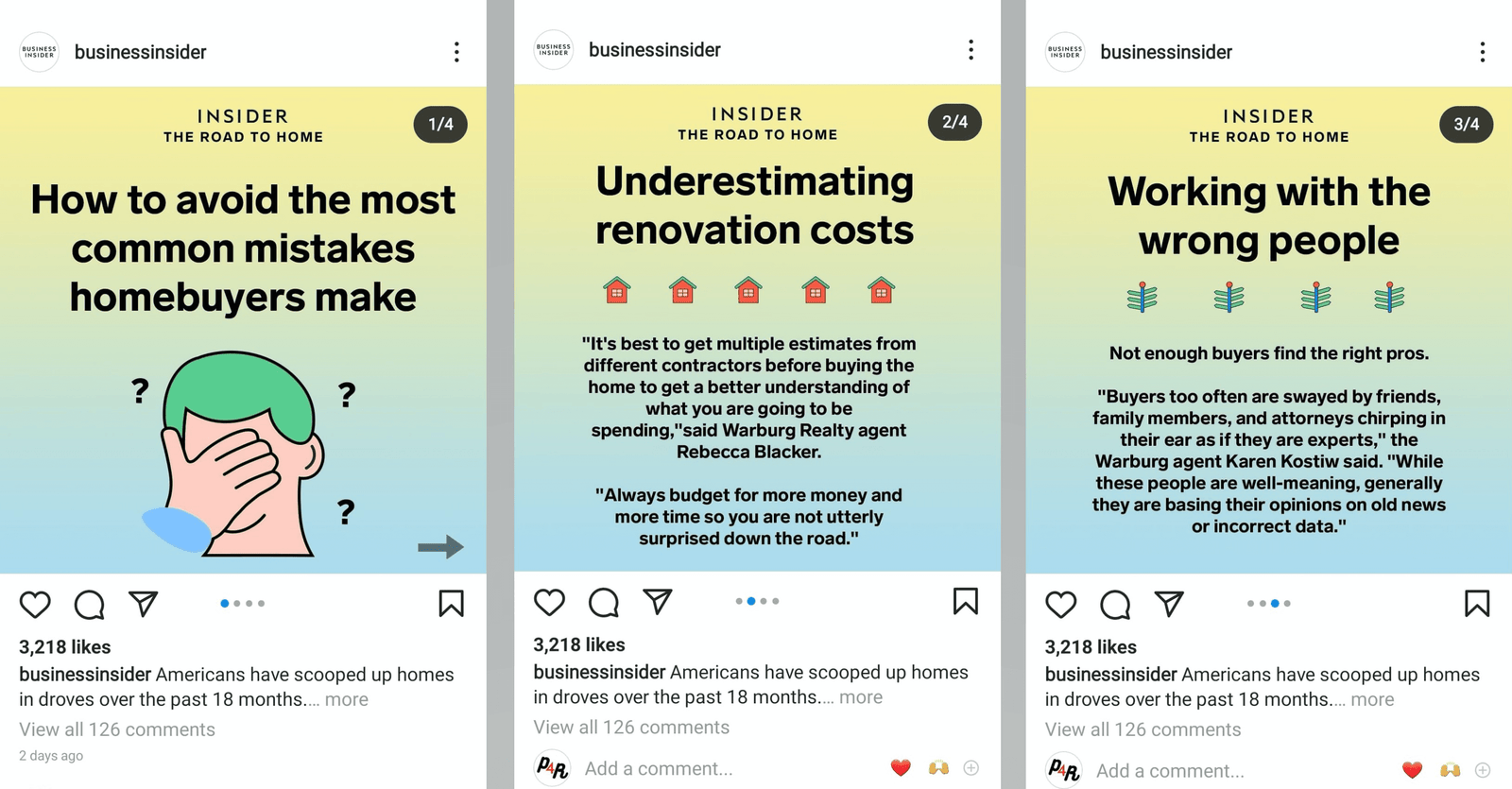
- Instagram carousel: short steps or comparison
- TikTok: one clear problem shown fast
- YouTube Shorts: one answer or demonstration
- Pinterest: search-friendly visual guide
- Facebook: community-friendly explanation or local proof
Use official resources such as Meta for Business, TikTok for Business, and YouTube Creators for current feature guidance.
7. Give AI Platform-Specific Constraints
Do not use one prompt for every channel. Tell AI what the format needs.
Example for a carousel: “Create seven slides. Slide one is the hook. Slides two to six each contain one action. Slide seven gives one next step. Keep slide text short.”
Example for a Short: “Create a 45-second script. Start with the problem, show three checks, and end with one practical action.”
8. Change the Angle, Not Just the Length
A common repurposing mistake is to make a long version, medium version, and short version of the same post. That is resizing, not true repurposing.
Change the angle. One source section can become:
- A “what to do” checklist
- A “what to avoid” mistake post
- A beginner FAQ
- A before-and-after example
- A decision comparison
9. Use Real Examples From the Source
Generic AI output often sounds repetitive because it lacks specifics. Pull real examples from the original content.
If a blog explains a local electrician scenario, keep that example in one repurposed post. Another post can use a different example from the article.
Do not let AI invent customer results.
10. Turn Tables Into Carousels
A comparison table can become a strong carousel. Each row or decision point can become a slide.
Example
A table comparing organic social, paid social, and email can become a five-slide carousel: goal, speed, cost, control, and best use case.
Keep the meaning accurate. Do not remove qualifiers just to make the slide shorter.
11. Turn Checklists Into Short Videos
A checklist can become a demonstration. Show each item rather than reading it word for word.
A website checklist could show: title, mobile layout, contact button, page speed, and form. This is more useful than a talking head reading five bullets.
12. Turn FAQs Into a Series
FAQ sections are ideal for repurposing because each question is already a standalone topic.
One 10-question FAQ can become ten short posts. Add a specific example to each answer so the series does not feel generic.
13. Turn Long Videos Into Written Posts
AI can help summarize a transcript, but do not publish the raw summary. Extract the strongest point and rewrite it for the platform.
Workflow
- Transcribe the video.
- Ask AI to identify distinct ideas.
- Select one idea.
- Check the original timestamp.
- Draft the social post.
- Verify the meaning.
- Add a platform-specific hook.
14. Turn Social Questions Back Into Blog Updates
Repurposing can work in both directions. If a social post creates many useful questions, add those questions to the original article.
This creates a feedback loop between website content and social content.
15. Create a Content Derivative Map
For every strong source asset, create a small map.
| Source section | Derivative | Platform |
|---|---|---|
| Checklist | 7-slide carousel | |
| Common mistake | 45-second script | YouTube Shorts |
| Customer scenario | Text story | |
| Comparison table | Decision graphic | |
| FAQ | Question post |
This makes the repurposing plan visible before production begins.
16. Use AI to Create Multiple Hooks
Ask for ten hook options for one idea. Then choose based on platform and tone.
Good hooks are specific. “Three ways to improve your website” is better than “This will change your business forever.”
17. Use a “No Repetition” Prompt Rule
Tell the model to compare each draft with the others and flag repeated ideas, phrases, examples, and conclusions.
Then remove duplicates manually. AI can miss subtle repetition, so human review remains important.
18. Create a Brand Voice Layer
After the first draft, apply your style rules. Use simple language, preferred spelling, sentence length, and call-to-action style.
Do not rely on vague instructions such as “make it human.” Give concrete rules and examples.
19. Verify Every Fact Against the Source
AI can add details that were not in the original. Compare the draft with the source before posting.
Check statistics, dates, product features, names, prices, and quotes. If the social post needs a current fact, verify it with the primary source.
20. Do Not Invent Authority
Do not ask AI to add fake experts, brands, quotes, or research just to make the post sound credible. Use real sources only when they add value.
For example, link to Google Search Central when a post discusses official search guidance.
21. Add a Distinct Call to Action
Not every repurposed post should end with the same “read the full blog.” Match the action to the content.
- Checklist: save the post.
- FAQ: reply with a question.
- Comparison: view the full table.
- Case example: see the detailed guide.
- Product demo: check specifications.
22. Schedule Derivatives Across Time
Do not publish six versions of one article in the same week. Spread them across the month and mix them with other topics.
This reduces audience fatigue and lets you learn which angle works best.
23. Keep a Repurposing Library
Track source assets and derivatives in a spreadsheet.
- Source title
- Source URL
- Core themes
- Derivative idea
- Platform
- Status
- Publish date
- Performance note
This prevents accidental repeats.
24. Measure by Angle
If the same source creates several posts, compare the angles. Maybe the mistake post earns shares while the checklist earns saves and the example earns website clicks.
This tells you more than comparing raw formats alone.
25. Use Repurposing to Test Future Blog Ideas
A short social post can test interest in a topic before you build a large article. If the audience asks many follow-up questions, the topic may deserve a deeper resource.
Do not let social engagement become the only research signal, but use it as one input.
26. Build a Weekly AI Repurposing Workflow
Monday: choose the source
Select one strong article, video, or guide.
Tuesday: extract ideas
Ask AI for 15 distinct atomic ideas. Select five.
Wednesday: map formats
Choose the best platform and format for each idea.
Thursday: draft and review
Use AI for first drafts. Check facts, voice, repetition, and examples.
Friday: prepare assets and schedule
Create visuals, check links, and schedule posts across the next two or three weeks.
27. Example: One Blog Into Ten Posts
Suppose you have a guide called “Local SEO Checklist for Small Businesses.” You could create:
- Carousel: five local SEO basics
- Short video: one Google Business Profile category mistake
- Text post: how to ask for reviews ethically
- Graphic: local page checklist
- FAQ video: do you need a page for every city?
- LinkedIn example: local electrician page structure
- Pinterest visual: 30-day local SEO plan
- Facebook post: three business detail errors to fix
- Short video: mobile contact button check
- Poll: which local SEO task is hardest?
These posts come from one source but solve different micro-problems.
28. Common AI Repurposing Mistakes
| Mistake | Better approach |
|---|---|
| Asking for ten summaries | Extract distinct atomic ideas first |
| Using one caption everywhere | Adapt to each platform |
| Letting AI invent examples | Use verified source examples |
| Posting derivatives together | Spread them across the calendar |
| Repeating one call to action | Match the action to the post |
| Never updating the source | Use social questions to refresh the original |
29. Run a Source-to-Post Accuracy Check
Before scheduling a repurposed post, compare it with the source one final time. Mark each specific number, feature, quote, and result as verified, needs context, or unsupported.
For example, if an article says a workflow “may reduce manual editing,” do not let a social draft turn that into “cuts editing time by 50%” unless a reliable source supports that number. Remove unsupported precision instead of inventing evidence.
Keep the original article URL, video timestamp, or document reference in your production sheet. That lets an editor verify the meaning quickly and makes future updates easier.
30. Create a Repurposing Quality Score Before Scheduling
A simple scoring system can stop weak derivatives from filling the calendar. Give each draft one point for each requirement it meets: it solves one clear problem, uses a distinct angle, matches the platform, includes a verified example or fact, has a useful next step, and does not repeat another scheduled post.
A draft that scores six out of six is ready for final review. A draft that scores three should return to editing rather than being published just because the calendar has an empty slot.
Real-world example
A software company turns a webinar into five LinkedIn posts. Two posts explain the same reporting feature with different wording. The scorecard flags the overlap. The team keeps one reporting post and replaces the second with a troubleshooting example from another section of the webinar.
Review the source mix each month
If most derivatives come from one article, the audience may see the same topic too often. Mix sources across product education, customer questions, research, how-to guides, and case examples. This keeps the content library broader while still saving production time.
The score does not need special software. Add six columns to the repurposing sheet and mark yes or no. The value comes from forcing a quick quality decision before scheduling.
Frequently Asked Questions
What content can I repurpose with AI?
Blogs, videos, webinars, podcasts, newsletters, reports, FAQs, product guides, and case studies can all work when the source is accurate and useful.
How do I stop AI content from sounding repetitive?
Extract separate ideas first, vary the angle and format, use real examples, and run a repetition review before publishing.
Should I post the same content on every platform?
Reuse the idea, but adapt the structure, length, hook, and visual format to each platform.
Can AI create all the social posts automatically?
It can create drafts, but a human should verify facts, tone, links, examples, and platform fit.
How many social posts can one blog create?
There is no fixed number. A detailed guide may support ten or more distinct posts. A short article may support only two or three.
Conclusion
AI makes content repurposing faster when you use it to find and reshape distinct ideas, not to generate endless summaries. Start with a strong source. Extract atomic ideas. Match each idea to the right format and platform. Use real examples. Verify facts. Spread derivatives across time. Then measure which angles create useful audience actions.
The best repurposing system helps a small team get more value from work it has already done while keeping every new post useful on its own.