How to Write SEO-Friendly Blog Posts That Rank and Help Readers
An SEO-friendly blog post should do two things at once. It should help a real person solve a problem, and it should make the topic easy for search engines to understand. These goals are not in conflict. In most cases, the clearest article for a reader is also easier for a search engine to process.

The mistake is to start with keywords and forget the person behind them. A useful article starts with a question, need, or task. Then it uses a clear structure, direct language, strong examples, helpful links, and a sensible keyword plan. This guide walks through that process from topic choice to final edit.
You can use the same method for a business blog, niche website, service company, ecommerce store, or personal brand. The steps are simple enough for beginners but strong enough to become a repeatable content workflow.
1. Start With the Problem the Reader Wants to Solve
Before you write a title, ask what the reader is trying to do. A keyword is only a clue. “Email marketing tips” may mean the reader wants more opens, a better welcome sequence, or a simple plan for a new list. “Local SEO” may mean the person wants more calls from nearby customers.
Write one sentence that defines the article goal. For example: “By the end of this article, a small business owner should be able to plan and write one useful SEO blog post without keyword stuffing.” This sentence keeps the article focused.
Use search intent as your filter
Search intent is the reason behind a query. Common intent types include learning, comparing, finding a specific page, and taking action. Your format should match that intent. A “how to” query needs steps. A comparison query needs clear differences. A checklist query needs an actual checklist.
2. Choose One Primary Keyword and a Small Related Set
Your primary keyword should describe the main topic. It does not need to have the highest search volume. It needs to fit the page. Related keywords can cover close questions, synonyms, and subtopics.
For this article, the primary idea is “how to write SEO-friendly blog posts.” Related phrases include “SEO blog writing,” “SEO content writing,” “blog post SEO checklist,” and “write blog posts that rank.”
Avoid keyword stuffing
Do not force the exact phrase into every paragraph. Use it in the title, introduction, one useful heading if natural, and a few places where it makes sense. Then write normally. Search engines can understand related language and context.
For keyword planning, Google Keyword Planner can help you explore search terms. You can also use your own site data from Google Search Console to see which queries already trigger impressions.
3. Study the Search Results Before Drafting
You do not need to copy competing pages. You should understand what searchers are being shown. Search your topic and note the common formats. Are the top results guides, tools, lists, videos, product pages, or service pages?
Look for gaps. Maybe every article explains the theory but none gives a real example. Maybe the top pages are long but hard to scan. Maybe the advice is aimed at large companies while your reader is a small business owner. Those gaps can shape your angle.
Build an original angle
An original angle does not mean inventing facts. It means making the article more useful for a specific reader. You might include a working checklist, a realistic scenario, a decision table, a template, or a set of mistakes to avoid.
4. Create the Outline Before You Write
An outline stops a long article from becoming repetitive. Start with the main question. Break it into the smallest useful steps. Put those steps in a logical order.
A simple SEO blog outline may look like this:
- What the reader needs to achieve
- How to choose the topic
- How to research keywords
- How to build the outline
- How to write the draft
- How to optimize headings and metadata
- How to add links and images
- How to edit and publish
- How to measure and improve later
If two sections cover the same point, merge them before drafting. A shorter outline with distinct sections is better than a long outline that repeats itself.
5. Write an Introduction That Gets to the Point
A strong introduction does not need a long story. Tell the reader what problem you will solve, why it matters, and what the article will help them do.
A simple introduction formula
Use three parts. First, name the problem. Second, explain the practical cost of getting it wrong. Third, promise a useful outcome. Keep the tone calm and direct.
For example, a guide about website speed might open by saying that a slow site can frustrate visitors, especially on mobile. Then it can explain that the guide will show how to find the largest issues and fix the easiest ones first.
6. Use H1, H2, and H3 Headings as a Map
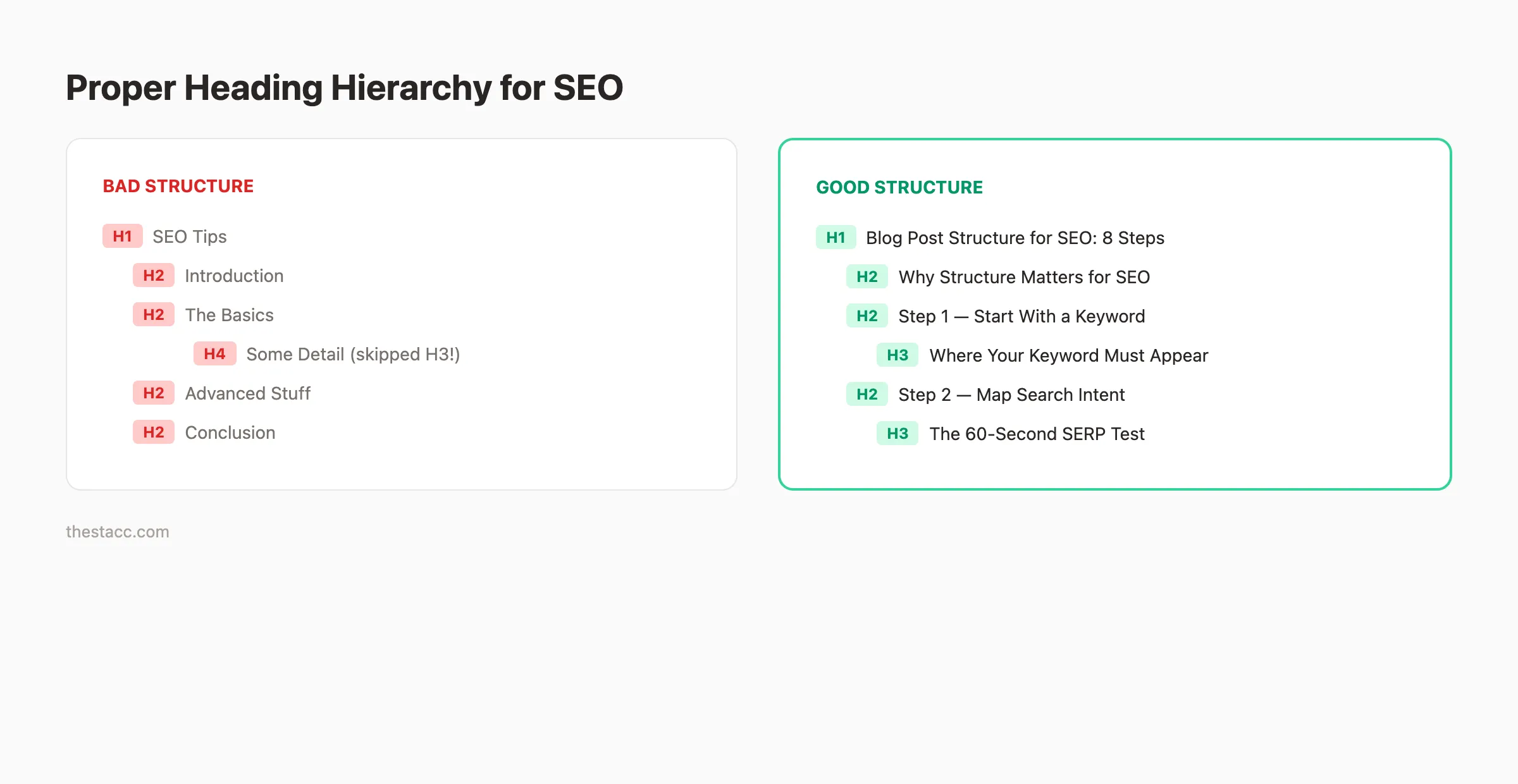
Your H1 should state the main topic. H2 headings should cover major parts of the answer. H3 headings should break down a specific H2 section when needed.
Do not use headings only to place keywords. A good heading helps a person scan the page and decide where to read next. If a heading sounds vague, make it more specific.
| Weak heading | Better heading |
|---|---|
| More Tips | How to Add Internal Links Without Overdoing It |
| Keywords | Choose One Primary Keyword and Related Terms |
| Images | Optimize Images for Speed and Accessibility |
7. Write Short, Clear Paragraphs
Readers often scan a page before they read it fully. Short paragraphs make that easier. Keep one main idea in each paragraph. Use plain words where possible. Break long explanations into steps, bullets, or examples.
Active voice also helps. “Compress the image before upload” is clearer than “The image should be compressed before it is uploaded.” You do not need to force every sentence into active voice, but it should be your default.
Use a practical tone
Write as if you are helping a smart person who is new to the task. Explain what to do, why it matters, and what a good result looks like. Avoid jargon when a plain term will work.
8. Add Examples That Show the Advice in Action
Examples turn broad advice into something a reader can use. If you tell readers to match search intent, show how. If you explain internal links, give an example anchor. If you discuss meta descriptions, write a sample.
Realistic scenario
Imagine a small accounting firm wants to write about bookkeeping for freelancers. Instead of a broad article called “Bookkeeping Tips,” it could target “monthly bookkeeping checklist for freelancers.” The article could then include a monthly task list, common expense categories, record storage tips, and a simple month-end routine.
That article solves a clear problem. It also gives the site natural opportunities to link to related services or deeper guides.
9. Use Internal Links to Build Context
Internal links connect related pages on your own site. They help readers continue their journey and help search engines understand relationships between pages.
Link to a related guide when it adds value. Link from new content to older strong pages. Also update older pages when a new article becomes a useful resource.
Use descriptive anchor text
Anchor text should explain where the link goes. “Read our WordPress technical SEO checklist” is clearer than “learn more.” Keep anchors natural and avoid repeating the same exact phrase dozens of times across the site.
10. Add External Links When They Improve Trust
An external link should help the reader verify a fact, understand a standard, or access an official tool. Link to primary sources when possible.
For search guidance, Google Search Central is a stronger source than a random blog that repeats Google’s documentation. For WordPress features, the official WordPress Documentation is useful.
Do not add authority links just to make the article look credible. Every link should serve a real purpose.
11. Write a Useful SEO Title
Your SEO title should describe the page clearly and encourage the right person to click. Put the main topic near the beginning when it reads well. Avoid vague claims and excessive punctuation.
A weak title might be “Amazing Blogging Secrets You Must Know.” A stronger title is “How to Write SEO-Friendly Blog Posts: A Practical Checklist.” The second title tells the reader what they will get.
12. Create a Short, Readable Slug
The slug should be simple. Remove filler words when they are not needed. Use lowercase words separated by hyphens.
For example, a title such as “How to Write SEO-Friendly Blog Posts That Rank and Help Readers” can use the slug “write-seo-friendly-blog-posts.” It is short, clear, and easy to recognize.
13. Write a Meta Description for the Searcher
A meta description should summarize the page in plain language. It can include the primary keyword, but the real job is to show the value of the page.
Example: “Learn how to write SEO-friendly blog posts with clear steps for search intent, keywords, headings, internal links, metadata, images, and final editing.”
Search engines may choose different text for some queries, so treat the description as a strong suggestion rather than a guaranteed snippet.
14. Optimize Images for Context, Speed, and Accessibility
Images should support the article. A screenshot can explain a tool. A diagram can simplify a process. A photo can add context. Avoid decorative images that add file size but no value.
Use descriptive file names and alt text
Alt text should describe what the image shows when that information matters. Do not fill alt text with keyword lists. If the image is purely decorative, it may not need descriptive alt text.
Resize images before upload. Use modern compressed formats when your workflow supports them. A large 5000-pixel photo is rarely needed inside a standard blog article.
15. Add a Table or Checklist When It Makes the Answer Faster
A table is useful for comparing choices. A checklist is useful when the reader needs to complete a process. Bullets are useful when items do not need a long explanation.
SEO blog post checklist
- One clear search intent
- One primary keyword
- Related terms used naturally
- Original outline
- Clear H1, H2, and H3 structure
- Short paragraphs
- Practical examples
- Internal links
- Useful authority links
- Optimized images and alt text
- SEO title and meta description
- Actionable conclusion
16. Edit for Usefulness Before You Edit for SEO
On the first edit, ignore keyword counts. Read the article as a customer. Remove repeated ideas. Replace vague lines with useful details. Add missing steps. Shorten long sentences. Check whether each section answers a real question.
Then perform the SEO edit. Check title, slug, headings, primary keyword placement, internal links, external links, image text, and metadata.
Delete filler without fear
Word count is not a quality score. If a paragraph repeats the previous one, remove it. If a long explanation can be replaced by a useful example, use the example. A 2,000-word article should contain 2,000 words of value, not 1,200 words of value plus 800 words of padding.
17. Check Facts, Names, and Claims
Before publishing, verify product names, statistics, legal claims, pricing details, and time-sensitive platform features. Use primary or reliable sources. If a detail changes often, avoid stating it as permanent.
This is especially important for health, finance, legal, and safety topics. Those areas may need expert review because a writing mistake can cause real harm.
18. Add a Useful Conclusion
A good conclusion should not repeat the entire article. Remind the reader of the main decision or next step. Give them a short action they can take today.
For this topic, the practical next step is to choose one clear reader problem, create an outline, and draft the most useful answer you can. Optimize after the answer is strong.
19. Measure the Post After Publication
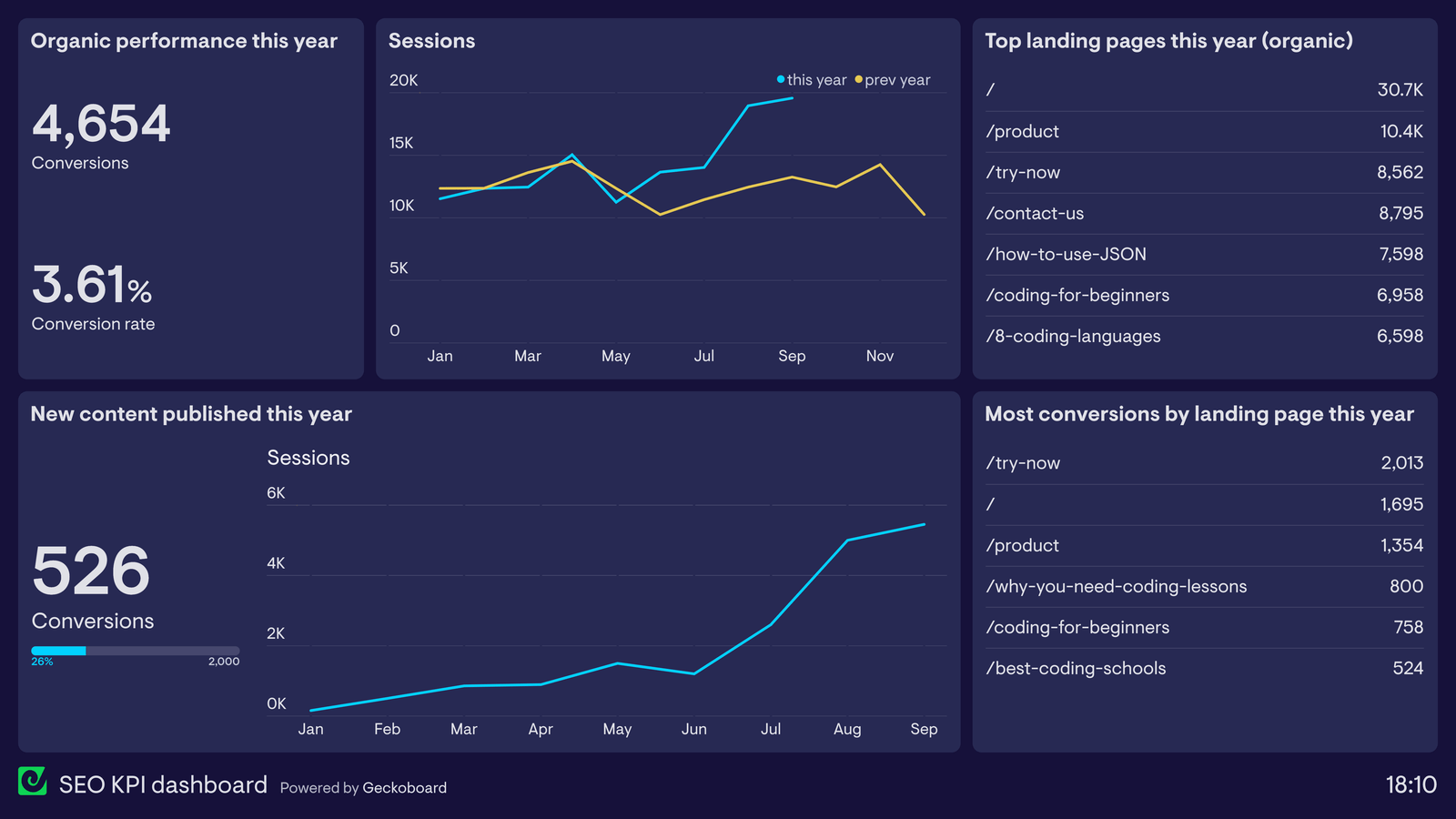
SEO is not finished when you press publish. Use Search Console to watch impressions, clicks, and queries. Use your analytics tool to see what readers do on the page. Look for signs that the article needs improvement.
A page with many impressions but a weak click rate may need a clearer title. A page that gets clicks but no meaningful action may not match intent. A post that ranks for unexpected related queries may need a new section that answers those questions better.
20. Refresh Strong Posts Instead of Rewriting Everything
Older posts can lose value when facts, examples, screenshots, or links become stale. Review important pages on a schedule. Fix broken links. Replace outdated examples. Add new questions that readers now ask. Remove advice that no longer applies.
Do not change a page only because it is old. Change it when the update makes it more accurate or useful.
Frequently Asked Questions
How many keywords should a blog post target?
Start with one main topic and one primary keyword. Use related terms naturally. You do not need a fixed keyword count.
How long should an SEO blog post be?
It should be long enough to solve the problem well. Some topics need 800 words. Others need 2,000 or more. Do not add filler to reach a number.
Should every article have external links?
Only when they help. Link to official tools, standards, documentation, or strong sources when a reader benefits from verification or deeper detail.
Can a new website rank with blog content?
Yes, but results depend on topic competition, site quality, crawlability, relevance, links, trust, and time. Focus on specific problems where your site can provide strong value.
Conclusion
Writing an SEO-friendly blog post is not about decorating text with keywords. It is about building the best clear answer for a real search need. Choose one problem. Understand intent. Build a useful outline. Write in plain English. Add examples, links, images, and a clear next step. Then optimize the title, slug, metadata, and internal structure.
If you follow that order, SEO becomes part of good writing rather than a separate layer. The result is content that is easier to read, easier to maintain, and more likely to earn useful search visibility over time.